Product Reports
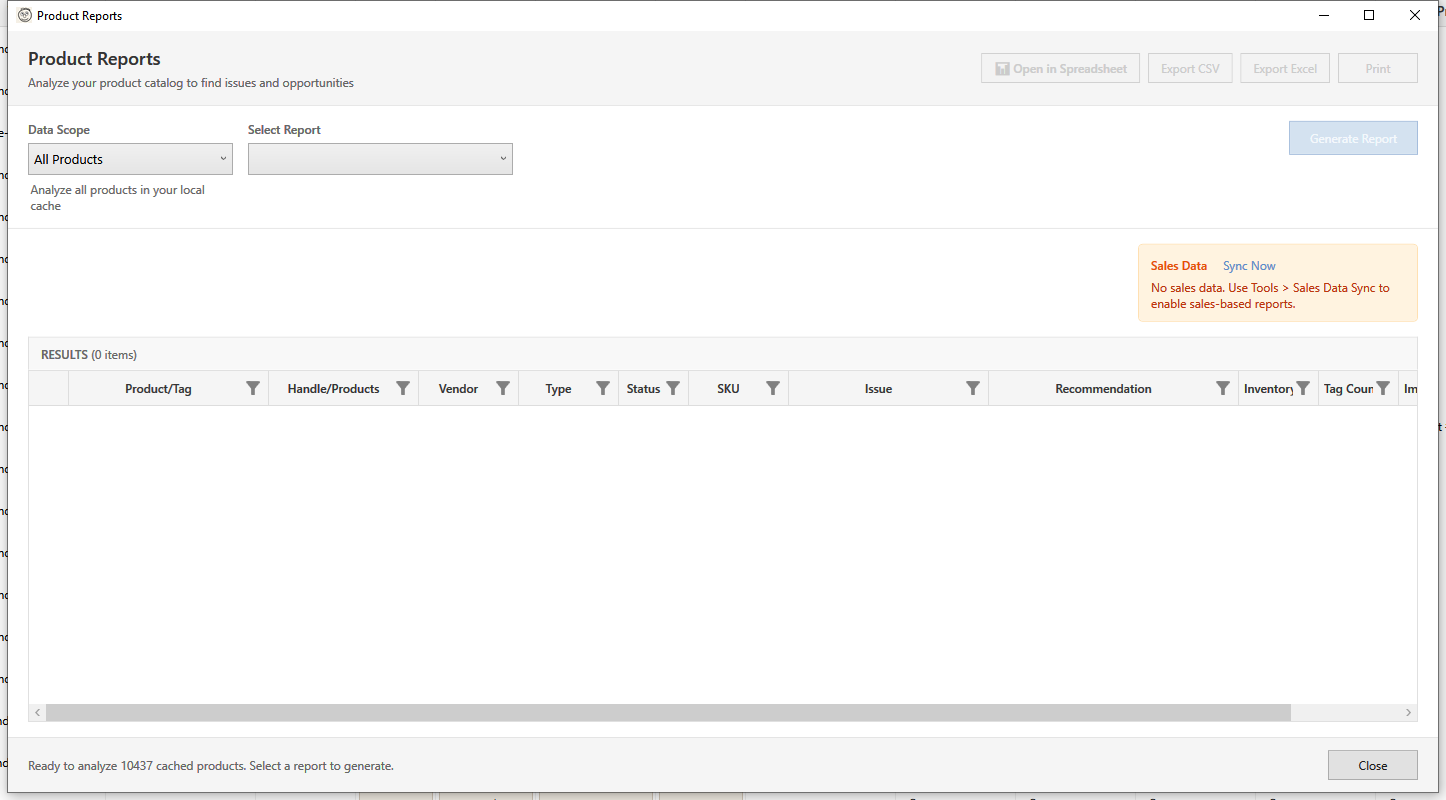
The Reports feature helps you analyze your product catalog, find issues, and identify opportunities through 20 different report types across four categories.
Opening Reports
Open using one of these methods:
- Menu: Reports
Note: Products must be loaded before generating reports.
Available Reports
Stock & Inventory Reports
| Report | Description |
|---|---|
| Duplicate Products | Find products with duplicate titles, SKUs, or barcodes |
| Dead Inventory | Products with no sales activity and stagnant inventory |
| Low Stock | Products with inventory below a specified threshold |
| Out of Stock | Products with zero inventory across all variants |
| Location Imbalance | Find variants with inventory concentrated at one location |
| Fulfillment Risk | Products with inventory at only one fulfillment location |
| Inventory Freshness | Identify stale inventory cache data that may be inaccurate |
| Location Capacity | Per-location inventory health summary and distribution |
Product Quality Reports
| Report | Description |
|---|---|
| Missing Images | Products without any images |
| Missing Descriptions | Products with empty or very short descriptions |
| Missing SEO Data | Products missing meta titles or descriptions |
| Price Analysis | Analyze pricing: no compare-at price, zero price, high discounts |
Sales & Velocity Reports
| Report | Description |
|---|---|
| Sales Velocity | Calculate days of stock remaining based on sales rate |
| Slow Movers by Location | Find slow-selling inventory by specific location |
| Variant Inventory Matrix | Detailed variant-level inventory with sales velocity |
Prerequisite: Sales & Velocity reports require a sales data sync before they can be used. If sales data has not been synced, these reports appear grayed out with a message explaining why. Use Tools > Sales Data Sync to import order history. The Dead Inventory report can also optionally use sales data for more accurate results when the "Use Sales Data" parameter is enabled.
Organization Reports
| Report | Description |
|---|---|
| No Collections | Products not assigned to any collection |
| Multiple Collections | Products that appear in more than one collection |
| High Variant Count | Products with many variants (potential performance issues) |
| Never Published | Products in draft status that were never published |
| Tag Analysis & Cleanup | Find tags used by few products and clean up unused tags |
Report Configuration
Scope Selection
Choose which products to analyze:
- Selected Products - Only products selected in the grid
- All Products - All products loaded in the cache
Parameters
Each report has configurable parameters:
Duplicate Products
| Parameter | Description | Default |
|---|---|---|
| Match By | Which field to compare (Title, SKU, Barcode, or All) | All |
| Case Sensitive | Whether matching is case-sensitive | No |
Dead Inventory
| Parameter | Description | Default |
|---|---|---|
| Days Without Sales | Threshold period | 90 days |
| Minimum Stock | Only include if > X stock | 1 |
Low Stock
| Parameter | Description | Default |
|---|---|---|
| Threshold | Stock level to flag | 10 |
Missing Descriptions
| Parameter | Description | Default |
|---|---|---|
| Minimum Length | Characters required | 50 |
Missing SEO
| Parameter | Description | Default |
|---|---|---|
| Check Title | Include missing SEO titles | Yes |
| Check Description | Include missing meta descriptions | Yes |
Price Analysis
| Parameter | Description | Default |
|---|---|---|
| Analysis Type | What to check: No Compare-At Price, Zero Price, High Discount (>50%), or All Issues | All Issues |
High Variant Count
| Parameter | Description | Default |
|---|---|---|
| Threshold | Variants to flag | 50 |
Generating Reports
- Select report type from dropdown
- Configure parameters
- Choose scope (all/selected/filtered)
- Click Generate Report
- Wait for analysis to complete
Report Results
Results Grid
The results grid shows:
| Column | Description |
|---|---|
| Product | Product title |
| SKU | Primary SKU |
| Issue | What was detected |
| Recommendation | Suggested action |
| Value | Relevant metric |
Sorting and Filtering
- Click column headers to sort
- Use grid filters to narrow results
- Group by issue type
Row Colors
- Red - Critical issues
- Yellow - Warnings
- Gray - Informational
Report Details
Duplicate Products Report
Finds products with similar titles:
Issue Types:
- Exact match - Identical titles
- High similarity - Very similar (>90%)
- Moderate similarity - Somewhat similar (threshold-90%)
Recommendations:
- Merge duplicate products
- Differentiate titles
- Delete true duplicates
Dead Inventory Report
Products with stock but no sales:
Identifies:
- Slow-moving inventory
- Overstocked items
- Products to discontinue
Recommendations:
- Discount to move stock
- Bundle with popular items
- Discontinue and liquidate
Low Stock Report
Products approaching stockout:
Use For:
- Reorder planning
- Stock alerts
- Purchasing prioritization
Recommendations:
- Reorder from supplier
- Set reorder point
- Enable back-in-stock notifications
Out of Stock Report
Products with zero inventory:
Identifies:
- Currently unavailable products
- Products needing restock
- Items to potentially archive
Recommendations:
- Restock popular items
- Archive discontinued items
- Update product availability
Missing Images Report
Products without images:
Why Important:
- Reduces conversion rate
- Looks unprofessional
- May hide from some sales channels
Recommendations:
- Add product photos
- Use placeholder images
- Prioritize high-value items
Missing Descriptions Report
Products with empty/short descriptions:
Impact:
- Poor SEO performance
- Lower conversion rate
- Customer confusion
Recommendations:
- Write descriptions
- Use AI generator
- Apply bulk description templates
Missing SEO Report
Products without SEO optimization:
Checks:
- SEO Title empty or same as product title
- SEO Description empty
Recommendations:
- Add unique SEO titles
- Write meta descriptions
- Use bulk SEO edit
Price Analysis Report
Products with pricing issues:
Flags:
- $0 prices (might be error)
- Very high prices (outliers)
- Compare-at lower than price
- Missing prices
Recommendations:
- Review and correct pricing
- Verify compare-at prices
- Check for data entry errors
No Collections Report
Products not in any collection:
Impact:
- Products may be hard to find
- Not in navigation
- Lower discoverability
Recommendations:
- Assign to relevant collections
- Create new collections if needed
- Use smart collections for auto-assignment
Products in Multiple Collections Report
Products appearing in more than one collection:
Parameters:
| Parameter | Description | Default |
|---|---|---|
| Minimum Collections | Flag if in more than X collections | 1 |
Use For:
- Finding over-categorized products
- Collection organization audit
- Cleanup before migration
Context Menu Actions:
Right-click products in this report for quick actions:
- View Collections - See which collections contain this product
- Remove from Collection - Remove from a specific collection
- Keep Only In - Keep in one collection, remove from others
Recommendations:
- Review if multiple assignments are intentional
- Consider if product belongs in most relevant collection only
- Use for cleaning up before store migrations
High Variant Count Report
Products with many variants:
Why Flag:
- Can slow down your store
- Hard to manage
- May indicate need to split
Recommendations:
- Consider splitting into multiple products
- Remove unused variants
- Optimize variant structure
Never Published Report
Draft products never activated:
Identifies:
- Incomplete products
- Abandoned listings
- Products needing attention
Recommendations:
- Complete and publish
- Delete if not needed
- Review why not published
Tag Analysis & Cleanup Report
Analyzes tag usage across your catalog:
Identifies:
- Tags used by very few products
- Inconsistent tag naming (capitalization, spacing)
- Redundant or overlapping tags
Recommendations:
- Remove unused tags
- Standardize tag naming conventions
- Consolidate similar tags
Location Imbalance Report
Finds variants with inventory concentrated at one location:
Why Important:
- Creates fulfillment bottlenecks
- Longer shipping times for distant customers
- Single point of failure risk
Recommendations:
- Redistribute stock across locations
- Set up transfer orders
- Review allocation strategy
Fulfillment Risk Report
Products with inventory at only one fulfillment location:
Identifies:
- Products vulnerable to disruptions at a single location
- Variants with no backup fulfillment option
Recommendations:
- Stock at multiple locations
- Set minimum stock levels per location
- Plan contingency fulfillment options
Inventory Freshness Report
Identifies stale inventory cache data:
Why Important:
- Stale data can lead to overselling or underselling
- Cached quantities may not reflect recent orders
- Regular sync keeps data accurate
Recommendations:
- Sync inventory data regularly
- Prioritize syncing high-volume products
- Set up automatic sync schedule
Location Capacity Report
Per-location inventory health summary:
Shows:
- Total inventory per location
- Number of active variants per location
- Distribution percentage across locations
Sales Velocity Report
Calculates days of stock remaining based on sales rate:
| Parameter | Description | Default |
|---|---|---|
| Sales Period | Days of sales data to analyze | 30 days |
Identifies:
- Products selling faster than expected (urgent restock needed)
- Products with excess inventory relative to sales rate
- Days until stockout per variant
Slow Movers by Location Report
Finds slow-selling inventory at specific locations:
Use For:
- Identifying location-specific slow movers
- Planning targeted markdowns
- Optimizing stock transfers between locations
Variant Inventory Matrix Report
Detailed variant-level inventory with sales velocity:
Shows:
- Per-variant inventory across locations
- Sales velocity per variant
- Days of stock remaining per variant
- Highlights critically low and overstocked variants
Exporting Reports
Export to CSV
- Generate report
- Click Export CSV
- Choose save location
- Opens in spreadsheet software
Export to Excel
- Generate report
- Click Export Excel
- Formatted XLSX with headers
Print Report
- Generate report
- Click Print
- Print preview opens
- Select printer
Taking Action
Jump to Product
- Select a row in report
- Click Go to Product
- Product highlighted in main grid
Bulk Fix
- Select multiple rows
- Click Fix Selected
- Opens appropriate bulk editor
Select in Grid
- Generate report
- Click Select All in Grid
- All report items selected in main grid
- Use bulk tools to fix
Best Practices
- Run regularly - Weekly or monthly health checks
- Prioritize by impact - Fix high-value items first
- Track progress - Re-run reports to see improvement
- Set thresholds - Adjust parameters to your business
- Act on results - Reports only help if you take action
Troubleshooting
"No results found"
- Your catalog may not have the issues
- Check parameters aren't too strict
- Verify products are loaded
"Report takes long time"
- Large catalogs take longer
- Use filtered scope for faster results
- Some reports require inventory data
"Export failed"
- Check disk space
- Verify write permissions
- Try different format