Connection Quick Reference
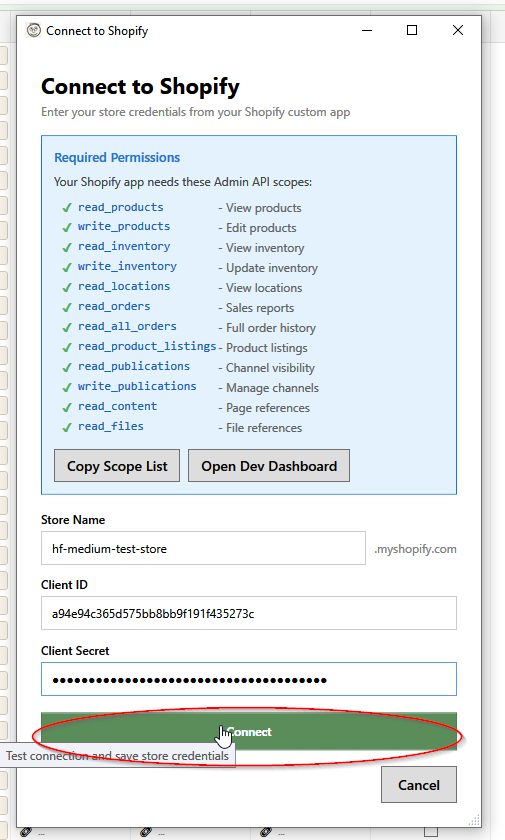
A quick checklist for connecting HF Product Manager to your Shopify store.
Setup Checklist
In HF Product Manager
- [ ] Open Add Store dialog
- [ ] Click "Copy Scope List" button
In Shopify Store Admin
- [ ] Go to Settings → Apps
- [ ] Click Develop apps
- [ ] Click Build apps in Dev Dashboard
- [ ] Click Create app → enter app name → Create
- [ ] Scroll to Access → Scopes field
- [ ] Paste the scope list you copied
- [ ] Click Release
- [ ] Enter version name → click Release
- [ ] Click your app name → click Install app
- [ ] Select your store → click Install
- [ ] Click Settings in the sidebar
- [ ] Copy Client ID and Client Secret
Back in HF Product Manager
- [ ] Enter your store name (without .myshopify.com)
- [ ] Paste Client ID
- [ ] Paste Client Secret
- [ ] Click Connect
Required Scopes
Copy this list or use the "Copy Scope List" button:
read_products,write_products,read_inventory,write_inventory,read_locations,read_orders,read_all_orders,read_product_listings,read_publications,write_publications,read_content,read_files
| Scope | What It Does |
|---|---|
read_products |
View products in grid |
write_products |
Edit products |
read_inventory |
View stock levels |
write_inventory |
Update stock |
read_locations |
Multi-location support |
read_orders |
Sales reports |
read_all_orders |
Full order history |
read_product_listings |
Publishing status |
read_publications |
Channel visibility |
write_publications |
Manage channels |
read_content |
Page reference metafields |
read_files |
File reference metafields |
Common Errors
| Error | Solution |
|---|---|
| Invalid credentials | Re-copy Client ID and Secret from Dev Dashboard Settings |
| Access denied | Create a new version with correct scopes and release it |
| Missing permissions | Add missing scopes in a new version, release, and reconnect |
| Store not found | Check store name spelling |
Links
- Full Setup Guide: Connecting to Shopify
- Setup Video: Watch on YouTube