Bulk Variant Field Editor
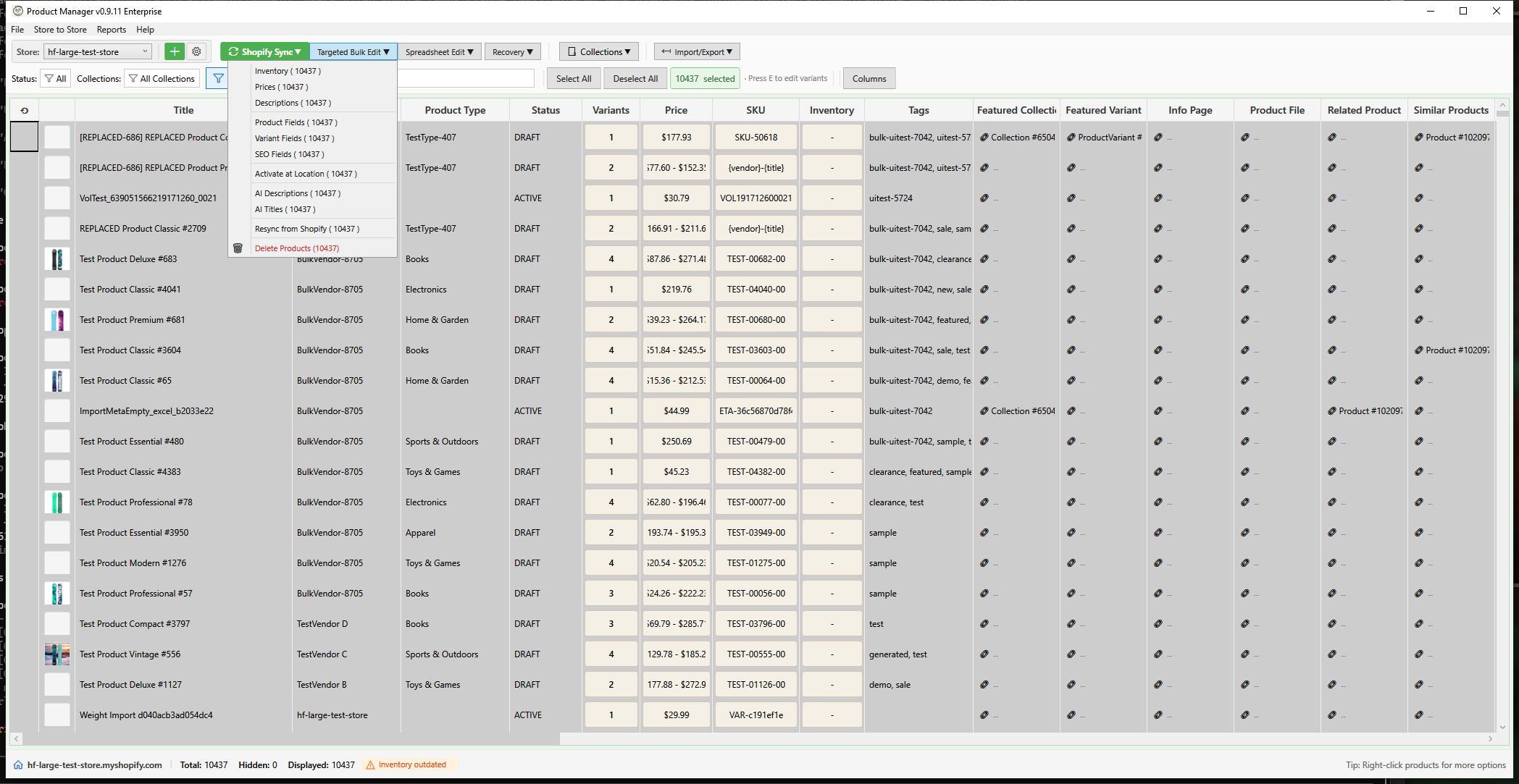
Edit variant-level fields like weight, barcode, SKU, and more across multiple products simultaneously. This tool supports both simple set operations and complex pattern-based generation.
Opening the Editor
- Select products in the main grid
- Open using one of these methods:
- Toolbar: Click Targeted Bulk Edit > Variant Fields
- Right-click: Select Bulk Edit > Variant Fields from context menu
Available Fields
| Field | Description | Use Case |
|---|---|---|
| Weight | Product weight with unit | Shipping calculations |
| Barcode | UPC, EAN, ISBN, etc. | Inventory management, POS |
| SKU | Stock Keeping Unit | Internal tracking |
| Taxable | Whether variant is taxable | Tax compliance |
| HS Code | Harmonized System code | International shipping |
| Inventory Policy | Overselling behavior | Stock management |
| Cost per Item | Cost of goods | Profit reporting |
| Country of Origin | Manufacturing country | Customs/compliance |
| Province of Origin | Manufacturing province/state | Customs/compliance |
Variant Selection
Apply to All Variants
Select this option to apply changes to every variant of the selected products.
Apply to Filtered Variants
Apply changes only to variants matching specific criteria:
Option Value Filter
Filter by product option values:
- Enable Filter by Option Value
- Select the option name (e.g., Size, Color)
- Enter values separated by commas (e.g., "Large, XL, XXL")
Only variants with matching option values will be edited.
SKU Pattern Filter
Filter by SKU using wildcards:
| Pattern | Matches |
|---|---|
SKU-* |
SKU-001, SKU-ABC, SKU-anything |
*-BLK |
SHIRT-BLK, PANTS-BLK |
PROD-??? |
PROD-001, PROD-ABC (exactly 3 chars) |
Price Range Filter
Filter by variant price:
- Enable Filter by Price range
- Enter minimum and/or maximum price
- Only variants within range will be edited
Field Operations
Weight Field
| Operation | Description | Example |
|---|---|---|
| Set To | Set exact weight | Set to 2.5 kg |
| Increase by Amount | Add fixed amount | Add 0.5 kg |
| Decrease by Amount | Subtract amount | Subtract 100 g |
| Increase by Percent | Increase by percentage | Increase 10% |
| Decrease by Percent | Decrease by percentage | Decrease 15% |
| Clear | Remove weight value | Clear all weights |
Weight Units:
- Kilograms (KILOGRAMS)
- Grams (GRAMS)
- Pounds (POUNDS)
- Ounces (OUNCES)
Text Fields (SKU, Barcode, HS Code)
| Operation | Description | Example |
|---|---|---|
| Set To | Set exact value | Set SKU to "NEWSKU-001" |
| Set from Pattern | Generate from template | {product.handle}-{variant.option1} |
| Prefix | Add text at beginning | Add "2025-" prefix |
| Suffix | Add text at end | Add "-v2" suffix |
| Find Replace | Find and replace text | Replace "OLD" with "NEW" |
| Clear | Remove value | Clear all barcodes |
Pattern Placeholders
Use placeholders to generate values from product/variant data:
| Placeholder | Content |
|---|---|
{product.handle} |
URL handle |
{product.vendor} |
Brand/vendor |
{product.title} |
Product name |
{product.type} |
Product category |
{variant.position} |
Variant number (1, 2, 3...) |
{variant.option1} |
First option value |
{variant.option2} |
Second option value |
{variant.option3} |
Third option value |
{date} |
Current date (YYYY-MM-DD) |
Example Patterns:
SKU: {product.handle}-{variant.option1}-{variant.position}
Result: blue-widget-large-1

Barcode: 123456{variant.position}
Result: 1234561, 1234562, 1234563...

HS Code: 6109.10.00
Result: 6109.10.00 (same for all)
Taxable Field
| Operation | Description |
|---|---|
| Set True | Mark variants as taxable |
| Set False | Mark variants as non-taxable |
Inventory Policy Field
| Operation | Description |
|---|---|
| Set to Deny | Don't allow purchases when out of stock |
| Set to Continue | Allow purchases when out of stock (overselling) |
Cost per Item Field
| Operation | Description |
|---|---|
| Set To | Set exact cost |
| Increase by Amount | Add fixed amount to cost |
| Decrease by Amount | Subtract from cost |
| Increase by Percent | Increase cost by percentage |
| Decrease by Percent | Decrease cost by percentage |
| Clear | Remove cost value |
Country of Origin Field
Enter the 2-letter ISO 3166-1 alpha-2 country code:
| Code | Country |
|---|---|
US |
United States |
CN |
China |
GB |
United Kingdom |
DE |
Germany |
JP |
Japan |
AU |
Australia |
CA |
Canada |
MX |
Mexico |
Preview and Apply
Preview Changes
- Configure field type, operation, and value
- Click Preview Changes
- Review the preview grid showing:
- Product and variant names
- SKU for identification
- Current value
- New value after operation
- Changed indicator
Understanding the Preview
| Column | Description |
|---|---|
| Product | Product title |
| Variant | Variant title (e.g., "Large / Blue") |
| SKU | Variant SKU for identification |
| Field | Field being edited |
| Current Value | Existing value |
| New Value | Value after operation |
| Changed | Whether value will change |
The status bar shows:
- Total variants affected
- Changed count (values that will update)
- Unchanged count (values already match)
Applying Changes
- Review all changes in preview
- Click Apply Changes
- Confirm when prompted
- Wait for Shopify sync to complete
Common Use Cases
Bulk SKU Generation
Generate consistent SKUs across products:
- Select products
- Choose SKU field
- Select Set from Pattern operation
- Enter pattern:
{product.handle}-{variant.option1} - Preview and apply
Update Weight for Shipping
Set weight for products without weights:
- Filter by Option Value (e.g., Size = "Large")
- Choose Weight field
- Select Set To operation
- Enter weight (e.g., 2.5 kg)
- Preview and apply
Add HS Codes for International
Add HS codes to specific product types:
- Select products of same type
- Choose HS Code field
- Select Set To operation
- Enter HS code (e.g., "6109.10.00")
- Preview and apply
Update Cost for Margin Tracking
Update costs after supplier price change:
- Select affected products
- Choose Cost per Item field
- Select Increase by Percent operation
- Enter percentage (e.g., 5%)
- Preview and apply
Disable Overselling
Prevent backorders on specific items:
- Select products
- Choose Inventory Policy field
- Select Set to Deny operation
- Preview and apply
Variant Metafields Tab
The Bulk Variant Fields window includes a Metafields tab for editing variant-level metafield values in bulk. This works identically to the product-level metafield editor but targets variant metafields.
Supported Operations
| Operation | Description |
|---|---|
| Set | Set metafield to a specific value |
| Clear | Remove metafield value |
| Increase | Increase numeric metafield (number_integer, number_decimal) |
| Decrease | Decrease numeric metafield |
Supported Metafield Types
All variant metafield types defined in your store are available:
- Text types (
single_line_text_field,multi_line_text_field,url) - Numeric types (
number_integer,number_decimal) - Boolean (
boolean) - Date types (
date,date_time) - Money, rating, weight, dimension, volume (JSON-based)
- Colour (
color) - Reference types (product, collection, metaobject references)
- List types (
list.*)
Metafield Validation
Values are validated against the metafield type and any defined validation rules (min/max, choices, regex) before applying. A preview shows current vs new values for each variant.
Best Practices
Before Editing
- Filter carefully - Use variant filters to target exactly what you need
- Preview first - Always preview before applying
- Start small - Test with a few products before bulk operations
- Document patterns - Save useful SKU/barcode patterns for reuse
SKU Management
- Use consistent patterns across your catalog
- Include product identifier and variant options
- Avoid special characters that may cause import issues
- Consider including year/season for seasonal products
Weight and Shipping
- Set weights for accurate shipping calculations
- Use consistent units across your catalog
- Include packaging weight in product weight
- Update weights after packaging changes
Customs and Compliance
- Use correct HS codes for your products (6-13 digits, dots allowed as separators)
- Verify country of origin is a valid 2-letter ISO country code (e.g., US, CN, GB)
- Province of origin must be a valid province/state code for the selected country (e.g., CA for California in the US, ON for Ontario in Canada)
- Keep HS codes updated when regulations change
- Consult customs experts for complex products
Troubleshooting
"No variants match filter"
- Check filter criteria are correct
- Verify option names match exactly
- Try broadening filter criteria
- Remove filters to see all variants
"Weight not saving"
- Ensure weight value is positive
- Check unit selection is appropriate
- Verify variant has inventory item (required for weight)
"HS Code rejected by Shopify"
- HS codes must be 6-13 digits
- Dots and spaces are allowed as separators (e.g., 6109.10.00)
- Verify code is valid for your products
"Cost not updating"
- Ensure variant has inventory item
- Cost must be positive number
- Check for read-only inventory locations
"Country code invalid"
- Use 2-letter ISO code only
- Codes are uppercase (US, not us)
- Verify code exists (see ISO 3166-1)
"Province code invalid"
- Province code must be valid for the selected country
- Examples: CA (California) for US, ON (Ontario) for CA, NSW for AU
- If no country is set, province validation is skipped
- Codes follow ISO 3166-2 standard
Keyboard Shortcuts
| Shortcut | Action |
|---|---|
| Enter | Apply changes |
| Escape | Cancel / Close window |