AI Title Generator
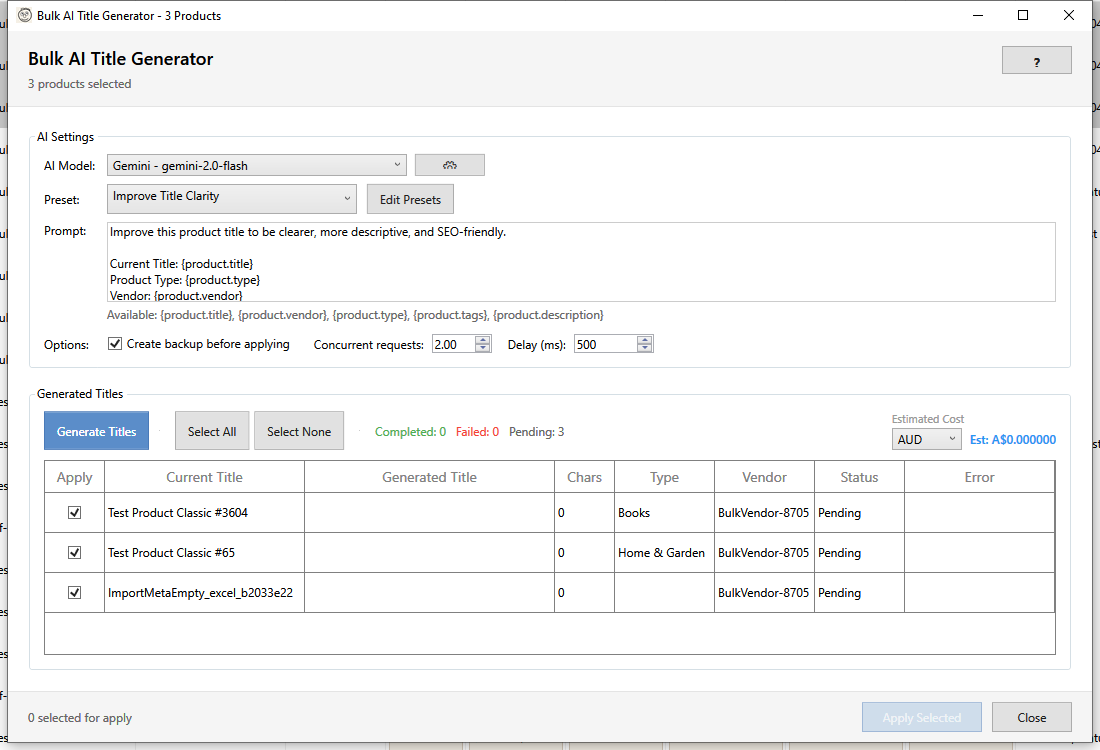
HF Product Manager's AI Title Generator creates compelling, SEO-optimized product titles using your choice of AI provider. Titles are automatically cleaned to remove common AI artifacts.
How It Works
Your Prompt + Product Data
         │
         ▼
    ┌─────────┐
    │ AI API  │  (Gemini, Claude, or OpenAI)
    └────┬────┘
         │
         ▼
  ┌────────────────┐
  │  Text Cleanup  │  Remove quotes, prefixes, newlines
  └───────┬────────┘
          │
          ▼
    Clean Title Text
Opening the Generator
- Select products in the main grid
- Open via:
- Toolbar: Targeted Bulk Edit > AI Titles
- Context Menu: Right-click > AI Titles
Available Placeholders
Use placeholders in prompts to insert product data:
| Placeholder | Content |
|---|---|
{product.title} |
Current product title |
{product.vendor} |
Brand/vendor |
{product.type} |
Product type/category |
{product.tags} |
Comma-separated tags |
{product.description} |
Product description |
Example Prompt
Create an SEO-optimized title for this product.

Current Title: {product.title}
Brand: {product.vendor}
Type: {product.type}

Requirements:
- Maximum 60 characters for SEO
- Include brand name
- Highlight key feature
- Do not add claims not supported by the product
Title Presets
HF Product Manager includes built-in title presets:
| Preset | Purpose | Best For |
|---|---|---|
| Improve Title Clarity | Make titles clearer and more descriptive | Vague or abbreviated titles |
| SEO Optimize Title | Optimize for search engines (under 60 chars) | Search ranking improvement |
| Make Title Compelling | Add attention-grabbing elements | Marketing campaigns |
| Standard Title Format | Reformat as "Brand - Product - Feature" | Catalog consistency |
| Shorten Title | Condense to under 50 characters | Long, wordy titles |
What Gets Cleaned Up
AI responses often include artifacts that are automatically removed:
| Pattern | Example | Cleaned Result |
|---|---|---|
| Surrounding quotes | "Acme Widget Pro" |
Acme Widget Pro |
| Title prefix | Title: Acme Widget |
Acme Widget |
| AI prefixes | Here's the title: Acme... |
Acme... |
| Line breaks | Acme\nWidget |
Acme Widget |
| Extra whitespace | Acme Widget |
Acme Widget |
Generation Options
Create Backup
When enabled, saves original titles before applying changes. Restore via Backup Manager if needed.
Concurrent Requests
| Setting | Speed | API Usage |
|---|---|---|
| 1 | Slowest | Lowest cost |
| 2 | Balanced | Default |
| 3-5 | Fastest | Higher quota |
Delay Between Requests
| Setting | Use Case |
|---|---|
| 100-200ms | High API quota |
| 500ms | Default, balanced |
| 1000ms+ | Avoid rate limits |
Results Grid
After generation, review results:
| Column | Description |
|---|---|
| Apply | Checkbox to include in final apply |
| Current Title | Original product title |
| Generated Title | AI-generated title |
| Chars | Character count (aim for under 60) |
| Type | Product type |
| Vendor | Brand/vendor |
| Status | Completed, Failed, Skipped |
Best Practices
SEO Title Guidelines
- Under 60 characters - Google truncates longer titles
- Include brand - Helps with brand recognition
- Lead with keywords - Most important words first
- Be specific - "Blue Wool Winter Scarf" beats "Nice Scarf"
Effective Prompts
- Set length limits - "Maximum 55 characters"
- Specify format - "Format: Brand - Product - Key Feature"
- Include constraints - "Do not add superlatives like 'best' or 'amazing'"
- Define priority - "Prioritize product type and key material"
Common Prompt Mistakes
| Don't | Do Instead |
|---|---|
| "Make it better" | "Improve clarity while keeping under 60 chars" |
| "Write a title" | "Write an SEO-optimized title in Brand - Product format" |
| No length limit | "Maximum 55 characters" |
| Vague instructions | "Include brand, product type, and key feature" |
Consistency Tips
- Use the same preset for similar products
- Create custom presets for different product categories
- Review character counts before applying
- Test with small batches first
Troubleshooting
"No AI provider configured"
Go to File > Settings > AI Settings and enter an API key for at least one provider.
"Titles too long for SEO"
Add explicit length requirements to your prompt:
- "Maximum 55 characters"
- "Keep title under 60 characters including spaces"
- Use the "Shorten Title" preset
"Inconsistent format across products"
- Create a custom preset with explicit format rules
- Include example in prompt:
Example: "BrandName - Product Type - Key Feature" - Apply to similar products in batches
"AI adding false claims"
Add to your prompt: "Do not add claims, superlatives, or features not in the original title or description."
"Rate limit exceeded"
- Increase delay between requests
- Reduce concurrent request count
- Wait 60 seconds before retrying
Keyboard Shortcuts
| Shortcut | Action |
|---|---|
| F1 | Open this help page |
| Escape | Cancel generation / Close window |
See Also
- AI Prompt Presets - Create custom prompts
- AI Content Generator - Full bulk AI reference
- Backup Manager - Restore original titles